
Decide who sees purchase prices
What you pay for goods stays with the people who need it; the owner decides whether sales staff and cashiers see it too.
Purchase prices, purchase price lists and, later, item costs and margins show what your business pays. Many owners prefer that the people selling don't see them.
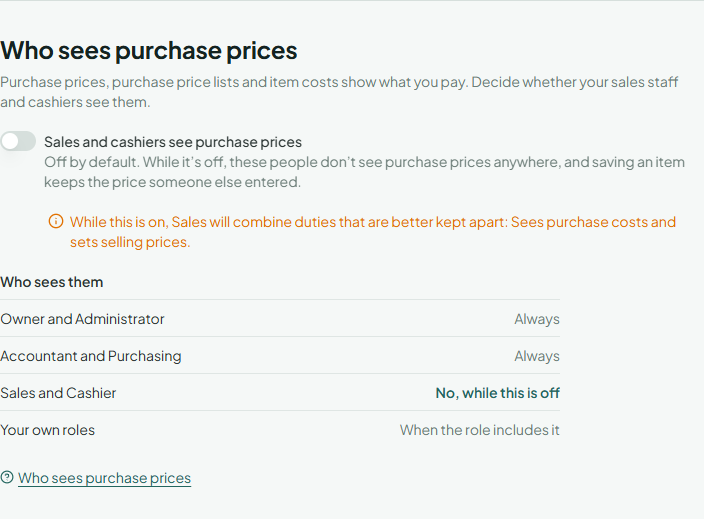
Who sees them
| Role | Sees purchase prices |
|---|---|
| Owner, Administrator | Always |
| Accountant, Purchasing | Always |
| Sales, Cashier | Only while the owner's switch is on |
| Inventory, Viewer | Never |
| Your own roles | When the role includes See and set purchase prices |
Turn it on or off
Only the owner can. Open Settings, find Who sees purchase prices and use Sales and cashiers see purchase prices. It's off at the start. You confirm who you are first, and the people it affects get an email. When turning it on gives a role duties that are better kept apart (seeing costs and setting selling prices), a note below the switch says so (Risky combinations).
What people without it see
- Items show no purchase price, and saving an item keeps the purchase price someone else entered.
- Purchase price lists aren't listed, and a vendor's purchase list isn't shown on their page.
- The change history hides purchase prices, and they can't undo a change to them.
Nothing is deleted when you turn it off: the prices are still there for everyone who may see them. To give one person access, give them a role that includes it (Roles and permissions).
Selling prices are kept the same way: only roles that include See and set sales prices and sales price lists see items' selling prices and sales price lists, which leaves out Purchasing and Inventory (What each role sees).