
Publish the legal texts
Write and publish new versions of the Terms of Service, the Privacy Policy and the Data Processing Agreement, in English and Indonesian, and decide whether people must accept them again.
The Terms of Service, the Privacy Policy and the Data Processing Agreement (DPA) are written in the console, in English and Indonesian. Only a superadmin opens Legal texts (under Security). A published version never changes; each change is a new version.
Write a new version
- Open Legal texts and choose New draft beside the text. The draft starts from the version in force, so you edit rather than retype. Each text has one draft at a time: Edit the draft opens it.
- Under English and Indonesian, write What changed (a few sentences shown when people are asked to accept) and the Text.
- Preview shows the text as people will read it. Save with Save; you can come back to a draft later.
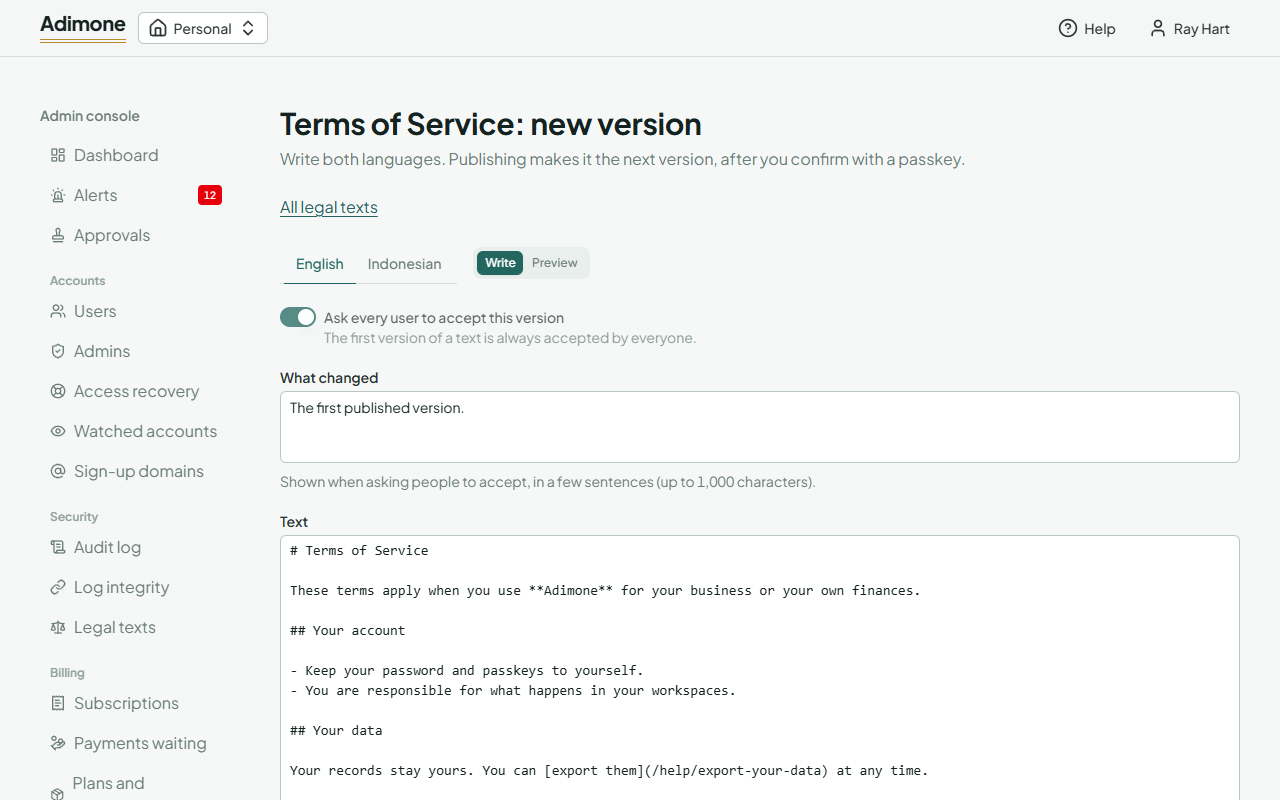
The text is Markdown: # and ## for headings, - or 1. for lists, **bold**, *italic* and [links](https://…). Anything else, such as HTML, shows as plain text.
Ask everyone again, or not
Ask every user to accept this version (for the DPA, every business owner) decides what publishing does:
- On: for a change people must agree to. Users must accept before going on (see Terms, privacy and marketing email); owners are reminded until they accept the DPA, without being blocked.
- Off: for corrections and small changes. Nobody is asked, and earlier acceptances still count.
The first version of each text always asks everyone.
Publish
Choose Publish and confirm. Adimone asks you to confirm it's you with a passkey. Both languages must be written. The draft becomes the next version, in force at once and public at its page (Public page). Earlier versions stay listed under the text, as they were published, with who published them and when; Discard the draft removes a draft you no longer want.