
Needs review
Sort the bank lines no rule or match took, with Adimone's suggestions learned from your earlier choices, and park the ones you can't place yet.
When you import a statement, matching rules and matches take what they can. Every line left over waits in Needs review, in plain words: money in or out, what the bank wrote, and the account it came through. Nothing goes into an account Adimone guessed without you saying so.
Needs review appears in the menu beside Overview while something waits there, with the number waiting. Working on it needs permission to reconcile and to see what accounts hold, usually the owner's and the accountant's.
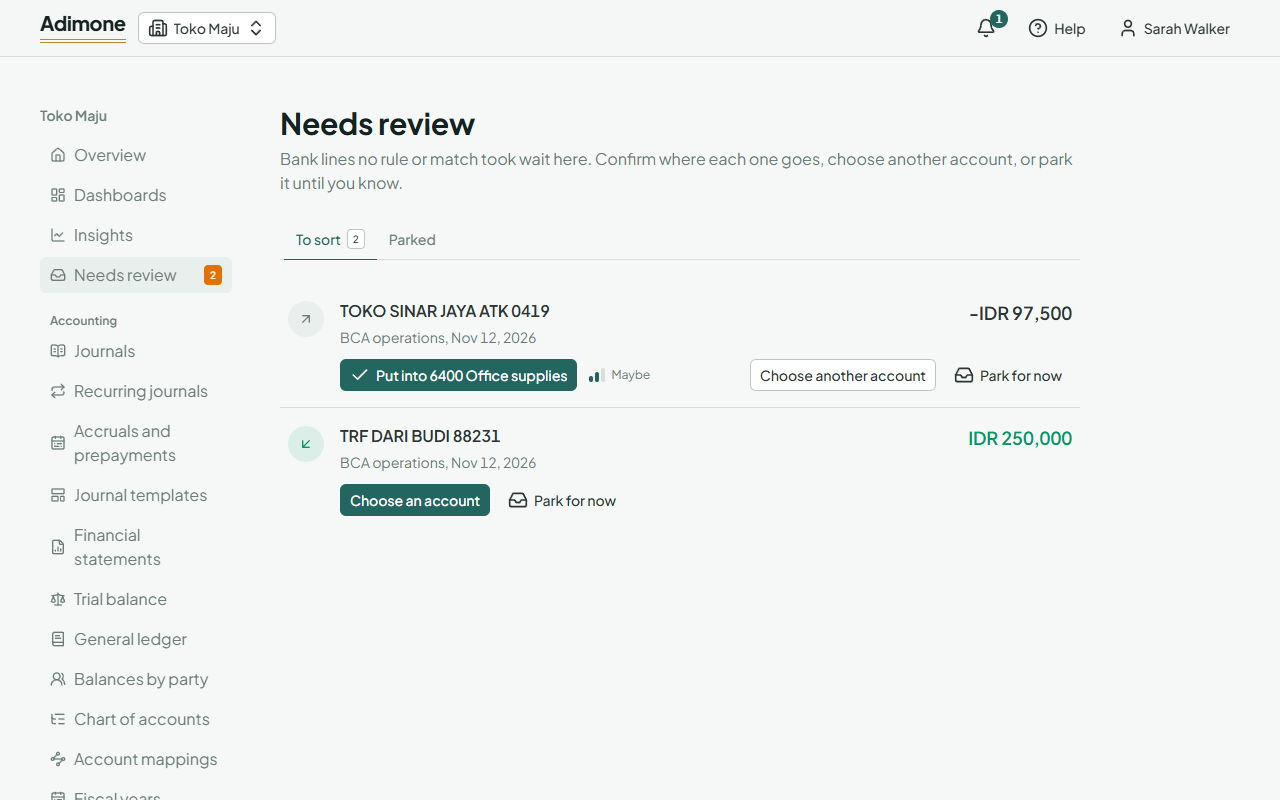
Suggestions and how sure they are
Each time you put a line somewhere, Adimone remembers the choice for lines like it: the same words from the bank, ignoring dates, reference numbers and words like TRF or QRIS. The next line like it shows where it most likely goes as a button, Put into and the account. One click posts the entry on the line's day and matches it to the line.
Beside the button, three bars say how sure the suggestion is:
- Likely (three bars): you chose it for lines like this at least three times, and nearly always.
- Maybe (two bars): you chose it once so far, or about half the time.
- A guess (one bar): you chose differently more often than not.
The more you agree with a suggestion, the surer it gets; a different choice lowers it.
After you confirm, the message offers Undo: the entry is reversed and the line comes back to be sorted.
Choose another account
When the suggestion is wrong, or there is none, choose Choose another account (or Choose an account).
- If you chose differently for lines like this before, those choices are listed first: pick one to fill in the form.
- Under Put into, pick the account the amount goes to. The accounts money is kept in (bank, cash and card accounts) aren't offered: money moves between them by a transfer.
- If you like, name a Customer or vendor, a Tax included in the amount (a sales tax on money in, a purchase tax on money out) and a Memo (empty, the bank's description is used).
- Choose Put it there.
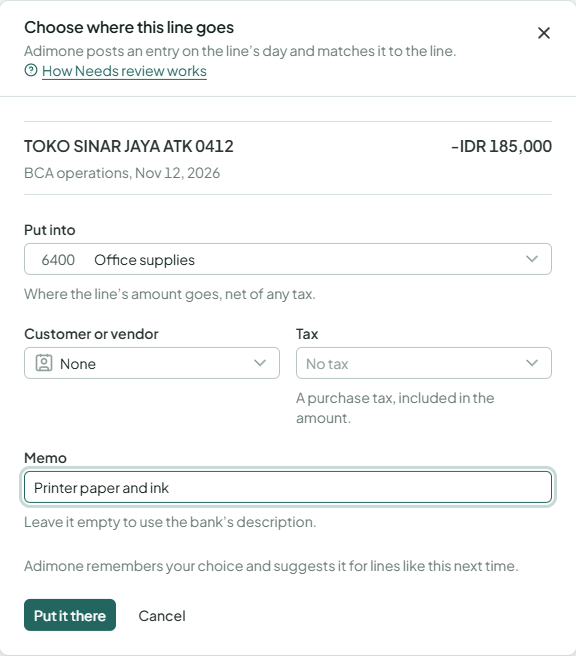
Adimone posts the entry on the line's day and matches it to the line, so your reconciliation moves on. A closed day, or one no fiscal year covers, is refused: open the period, or add the year first.
Park for now
Sometimes you don't know yet what a line is: a transfer from someone you don't recognise, a charge you need to ask about. Choose Park for now. The amount goes to the suspense account (in the General chart, 1490 Suspense), and the line counts as matched, so the reconciliation can still close.
Parked lines wait under Parked. When you know what one was, choose Sort out, pick the account and choose Sort it out: Adimone moves the amount out of the suspense account with an entry on the line's day, or today when that day is closed. A suspense account that isn't empty at the end of a period means something is still parked.
Parking needs an account mapped to Suspense in the account mappings.
Make this a rule
Once you have put lines like one into the same account at least three times, and nearly always, Rules you could add appears at the top: the bank's words, where you put them and how often. Choose Make this a rule to open a new matching rule already filled in. Check it and choose Add rule; from the next statement on, the rule takes those lines before they reach Needs review.
Taking a choice back
To change a line you already sorted, open the account on the Reconcile page, find the line under Matched and choose Undo the match. Its entries are reversed, Adimone forgets that choice, and the line is back in Needs review.