
Delete your account
Delete your Adimone account for good, and what happens to the businesses you own or work in.
Deleting your account can't be undone. You find it at the bottom of Account and security.
Before you start
- Businesses you own: hand each active one over to another member or archive it first (how). Adimone lists them and won't delete the account until that's done.
- Administrator accounts: another superadmin must remove your admin role first.
Delete it
- In Account and security, under Delete account, choose Delete my account….
- Type your account's email address to confirm, then choose Delete my account. Adimone may ask you to confirm it's you first.
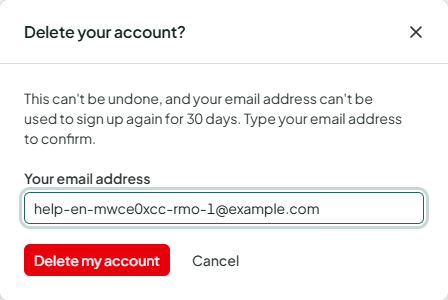
You are signed out everywhere and get an email confirming the deletion.
What happens
- Your account: your name, email address, password, two-step verification, passkeys and linked accounts are removed. The address can't be used to sign up again for 30 days.
- Businesses you work in: your memberships end. Records you made there stay, because they are part of the business's books, and show a deleted user instead of your name.
- Archived businesses you own: the administrator who has been a member the longest becomes the owner and gets an email. If there is no administrator, the business stays read-only without an owner and is kept as the law requires; its members are told and can contact support to take it over.
- Your personal workspace: removed for good after 30 days.
Deleted by an administrator
An administrator of the server can also delete an account, for example on request or after abuse. Then active businesses you own are handed over or left without an owner the same way, and deleting the account needs a second superadmin's approval when the server has one.